What Is AVIF and How Does It Compare with WebP?
What Is AVIF and How Does It Compare with WebP?
If you’ve been looking for ways to make your website faster, you may have come across image formats such as WebP and AVIF. Both are designed to reduce image file sizes while maintaining good visual quality, but they use different compression technologies and have some important differences.
AVIF is a modern image format that can produce particularly small files, while WebP offers an excellent balance between compression, quality, and compatibility.
But is AVIF actually better than WebP? And should you use it for your WordPress website?
In this guide, we’ll explain what AVIF is, how it works, how it compares with WebP, and when each format makes the most sense.
1. What Is AVIF?
AVIF stands for AV1 Image File Format. It is an image format based on the AV1 video compression technology and designed to store images efficiently.
Although AV1 is also used for video, AVIF applies its compression technology to still images and can also support animated image sequences.
One of AVIF’s biggest advantages is its ability to achieve small file sizes while preserving good visual quality.
AVIF supports several useful features, including:
- Lossy and lossless compression.
- Transparent backgrounds.
- High color depth.
- High dynamic range (HDR) images.
- Wide color gamuts.
- Animated images.
These features make AVIF useful for websites that need efficient image delivery, particularly when photographs account for a significant part of the page size.
However, the format isn’t automatically the best choice for every image. The final result depends on the source image, encoding settings, and the tools used to create it.
2. What Is WebP?
WebP is an image format developed by Google to make images more efficient for websites.
Like AVIF, it supports both lossy and lossless compression. It can also preserve transparency and display animated images.
WebP is widely used for blog photographs, product images, thumbnails, and website graphics because it often produces smaller files than traditional formats such as JPG and PNG.
Its main advantages include:
- Efficient compression for photographs and graphics.
- Good visual quality at relatively small file sizes.
- Support for transparent backgrounds.
- Lossy and lossless encoding options.
- Broad support in modern web browsers.
WebP is a practical choice for website owners who want to reduce image sizes without making their publishing workflow unnecessarily complicated.
While AVIF can offer better compression for many images, WebP remains a strong alternative, particularly when compatibility and ease of use are important.
3. AVIF vs WebP: What’s the Difference?
Both formats are designed for efficient image delivery, but they differ in compression efficiency, encoding performance, and some advanced capabilities.
| Feature | AVIF | WebP |
|---|---|---|
| Lossy compression | Yes | Yes |
| Lossless compression | Yes | Yes |
| Transparency | Yes | Yes |
| Animation | Yes | Yes |
| High color depth and HDR | Yes | More limited |
| File size | Often smaller | Often very efficient |
| Encoding speed | Can be slower | Often faster |
| Modern browser support | Broad | Broad |
| Best use | Maximum compression efficiency | Versatile everyday web images |
These are general tendencies rather than absolute rules. Neither format produces the smallest file for every possible image.
For example, a photograph may compress particularly well as AVIF, while a simple graphic might show little improvement over WebP.
The best approach is to compare both formats using representative images from your own website.
4. Which Format Produces Smaller Files?
File size is one of the main reasons to consider AVIF.
For many photographs, AVIF can achieve a similar visual quality at a smaller file size than WebP. This can reduce the amount of data visitors need to download, particularly on pages containing multiple large images.
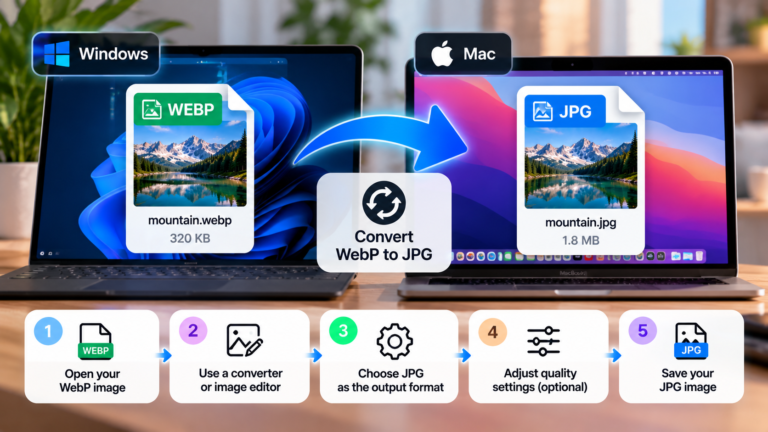
Imagine you have a photograph measuring 1920 × 1280 pixels.
| Format | Illustrative file size |
|---|---|
| Original WebP | 320 KB |
| Optimized AVIF | 220 KB |
| Difference | 100 KB saved |
These numbers are examples, not benchmark results or guaranteed savings. Actual file sizes depend on the image content, encoder, compression settings, and desired visual quality.
In this example, AVIF reduces the file size by approximately 31% compared with WebP.
That difference can add up when a website contains many photographs. However, if your WebP images are already well optimized, the improvement may be smaller.
It’s also important to compare images at similar visual quality. A much smaller file isn’t necessarily a better result if it introduces noticeable artifacts or loses important details.
5. Image Quality: Is AVIF Better Than WebP?
Both formats can produce excellent-looking images, but their compression methods can behave differently depending on the content.
AVIF can preserve impressive visual detail at low bitrates, making it particularly attractive for photographs and images with complex colors or gradients.
WebP also provides effective compression and can retain excellent quality at relatively small file sizes.
The final appearance depends on several factors:
- The original image quality.
- The compression level.
- The encoder and its settings.
- The amount of detail in the image.
- The size at which the image will be displayed.
For example, a detailed photograph may benefit from AVIF’s compression efficiency. On the other hand, a simple screenshot or graphic may not show a meaningful visual difference between the two formats.
Neither format guarantees better quality in every situation.
Tip: Compare AVIF and WebP at similar visual quality levels rather than comparing files with identical numerical quality settings. Different encoders can interpret those settings differently.
6. Compatibility: Does AVIF Work in All Browsers?
AVIF is supported by all major modern browser families, including Chrome, Edge, Firefox, Safari, and Opera. WebP also has broad support across modern browsers. <Cite refs={[«turn383774search0″,»turn383774search9»]}/>
The practical difference is that WebP has a longer history of widespread browser use, while AVIF support arrived later and may be missing from older browsers or software.
If your website serves visitors using legacy systems, it is worth considering fallback images.
HTML provides a convenient way to offer AVIF first and WebP as an alternative:
<picture>
  <source srcset="photo.avif" type="image/avif">
  <source srcset="photo.webp" type="image/webp">
  <img
    src="photo.jpg"
    alt="A golden retriever playing outdoors"
    width="1200"
    height="800"
  >
</picture>
The browser selects the first supported source and uses the JPG image as a fallback when necessary.
For a website with a modern audience, you may not need to manage fallbacks manually if your image delivery service already handles format negotiation.
7. Transparency and Advanced Features
Both AVIF and WebP support transparency, so either format can be used for logos, icons, and graphics that need transparent backgrounds.
They also support animated images, making them useful alternatives to older animation formats in suitable workflows.
AVIF has an additional advantage when working with high dynamic range images and higher color depths. These capabilities can be valuable for specialized photography and visual content.
However, most ordinary blog images don’t need advanced color features. For a typical WordPress article, compression efficiency, image quality, and compatibility will usually be more important.
Choose the format according to the image’s actual requirements rather than using advanced features simply because they’re available.
8. When Should You Use AVIF?
AVIF is worth considering when reducing image file size is a priority and your website supports it reliably.
Image-heavy websites
Photography websites, blogs, and online stores can benefit from smaller image downloads, especially when pages contain many large photographs.
Large photographs and banners
AVIF can be useful for prominent images that contribute significantly to the total page size.
Performance-focused websites
If you’re trying to improve loading performance, testing AVIF can reveal additional savings beyond your existing WebP images.
High-quality visual content
AVIF’s support for high color depth and HDR can make it useful for workflows that need those features.
However, don’t convert everything automatically. Test the images that have the greatest impact on your website’s performance and compare the actual results.
9. When Should You Use WebP?
WebP remains an excellent choice for many everyday website images.
Consider using WebP when:
- You want an efficient format with broad modern browser support.
- Your existing WordPress workflow already handles WebP well.
- You need lossy or lossless compression.
- You want transparency without using PNG.
- AVIF produces little additional savings for your images.
WebP can also be a useful fallback for AVIF in a modern image delivery workflow.
If your website already uses optimized WebP images, there’s no need to replace everything immediately. Measure the potential improvement first and prioritize changes that provide meaningful benefits.
10. How to Use AVIF in WordPress
If you run a WordPress website, you may be able to upload and serve AVIF images directly, depending on your WordPress version, hosting environment, and image processing setup.
Before making changes, check that your installation supports AVIF uploads and that your plugins or delivery services can process the format correctly.
A practical workflow looks like this:
- Select an image that could benefit from further optimization.
- Create AVIF and WebP versions using a compatible tool.
- Compare their file sizes and visual quality.
- Upload the preferred version or configure your image optimization system.
- Check that the image displays correctly on your website.
- Test the page’s loading performance.
Some optimization plugins and image delivery services can automate conversion and select an appropriate format for each visitor.
If you use a service that already handles image optimization, check its existing features before installing another plugin. Duplicate optimization systems can complicate your setup.
Keep your original images where possible so you can regenerate optimized versions later.
11. Common Mistakes When Choosing AVIF or WebP
Assuming AVIF is always smaller
AVIF often provides better compression, but the result varies. Some images may show only a small improvement over WebP.
Comparing files at different quality levels
A smaller AVIF file may simply be more heavily compressed than its WebP counterpart. Compare results at similar visual quality levels.
Ignoring encoding speed
AVIF encoding can require more processing time, depending on the encoder and settings. This may matter if you’re converting thousands of images.
Forgetting fallback support
If your website needs to support older browsers or applications, provide an appropriate alternative format.
Converting every image without testing
Not every image benefits equally from conversion. Test representative files and prioritize the ones that offer the greatest improvement.
12. Frequently Asked Questions
Is AVIF better than WebP?
AVIF often achieves smaller file sizes at comparable visual quality, particularly for photographs. WebP remains a versatile option with broad modern browser support. The best choice depends on the image and your workflow.
Is AVIF supported by WordPress?
Support depends on your WordPress version and hosting environment. Check your installation’s upload and image processing capabilities before building an AVIF workflow.
Does AVIF reduce image quality?
AVIF supports both lossy and lossless compression. Lossy encoding discards some image information, while lossless encoding preserves the original pixel data. Quality depends on the settings used.
Can AVIF replace WebP completely?
It can replace WebP for some use cases, but there is no universal need to abandon WebP. Using both formats can be useful when you want to optimize delivery across different browsers and workflows.
Which format is better for SEO?
Neither format automatically improves rankings. Both can contribute to better page performance by reducing image sizes, which may improve the user experience. Other factors, including hosting, caching, and responsive image delivery, also matter.
Should I convert my entire image library to AVIF?
Not without testing first. Start with large or frequently viewed images, compare the results, and decide whether the additional savings justify the conversion effort.
Final Thoughts
AVIF and WebP are both excellent options for modern websites. AVIF often offers better compression efficiency, while WebP provides a versatile and well-established solution for everyday image delivery.
If you’re starting a new optimization workflow, test AVIF against WebP using your actual images. If the size reduction is meaningful and your website supports the format, AVIF can be a valuable addition.
If your existing WebP images are already small and your website performs well, you may not need to change anything immediately.
The goal is simple: deliver images that look good, load efficiently, and work reliably for your visitors.